Odoo email setup: SMTP, custom domain, SPF and DKIM (2026)
Odotify team · Published · 9 min read
Email is how Odoo sends quotations, invoices, password resets and chatter messages, and how customer replies land back on the right record. When it is set up badly, those emails go to spam or never leave. This guide is for anyone running Odoo 17 to 20 who needs email to work: on Odoo's cloud, on Odoo.sh, or on a server of your own. It is based on the Odoo 20.0 email documentation and source code, read on 27 November 2026.
How does email work in Odoo?
Odoo sends email through an outgoing (SMTP) mail server and receives it through aliases, then files each message in the chatter of the record it belongs to. It is not an inbox like Gmail or Outlook. Odoo's own documentation lists the differences:
- Once a transactional email is sent, the email object is deleted; the content lives on in the record's chatter.
- There is no CC or BCC. Followers of a record decide who gets a copy.
- An incoming email is accepted only if its To address is a known alias, or if it is a reply to a message Odoo sent. Everything else bounces. Nothing waits in a spam folder.
Three special addresses do the routing:
| Address | Default local part | What it is for |
|---|---|---|
| Sender | notifications@ | The From address when the user's own address cannot be used |
| Reply-to | catchall@ | Collects replies and threads them on the right record |
| Bounce | bounce@ | Receives delivery errors and shows them as a red envelope in the chatter |
App aliases such as sales@ (a CRM team) or support@ (a Helpdesk team) create new records when someone writes to them.
Does Odoo email work out of the box?
Yes on Odoo Online and Odoo.sh; no on a server you run yourself. On Odoo's cloud, a new database sends and receives through its subdomain, so emails go out as notifications@company-name.odoo.com, replies come back to catchall@company-name.odoo.com and errors go to bounce@company-name.odoo.com. Odoo has already set up SPF, DKIM and DMARC for that subdomain.
On your own server, Odoo has no mail service behind it. The odoo.conf defaults are smtp_server = localhost on port 25, which only works if you run a mail server on the same machine. Running your own mail server and keeping it out of spam folders is hard work (DigitalOcean's documentation strongly advises against it), so in practice you need an email provider.
What is the daily email limit in Odoo?
On Odoo Online the default limit is between 5 and 200 emails a day, depending on the subscription (One App Free, trial or paid), the apps installed (Email Marketing and Marketing Automation, for example) and whether a migration is running. Every email leaving the database counts, including notifications of internal messages and logged notes. When the limit is reached, Odoo support can raise it, you can retry the next day from Settings, Technical, Emails, or you can add your own outgoing mail server so the limit no longer applies.
Two more limits catch people out:
- Port 25 is blocked on Odoo Online and Odoo.sh. Use 465, 587 or 2525.
- Odoo blocks mail loops. By default one address can send at most 20 emails that create records in 120 minutes (system parameters
mail.gateway.loop.minutesandmail.gateway.loop.threshold).
On your own server there is no Odoo quota, but your email provider has one, and some clouds block SMTP entirely. DigitalOcean blocks ports 25, 465 and 587 on every Droplet; providers such as Mailgun and Postmark also listen on 2525 for that reason. See Odoo on DigitalOcean.
Steps to set up outgoing email in Odoo with your own SMTP server
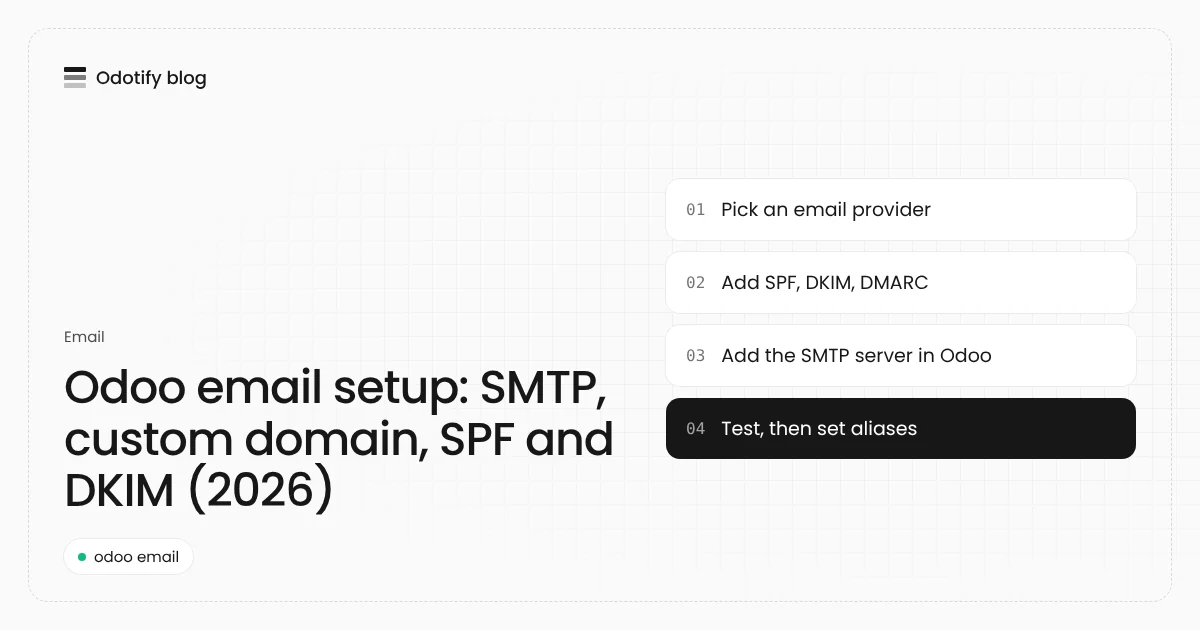
- Choose an email provider for transactional mail (Amazon SES, Brevo, Mailgun, Postmark, Google Workspace or Microsoft 365, for example) and verify your domain with it.
- Add the provider's SPF and DKIM records, plus a DMARC record, in your domain's DNS (details below).
- In Odoo, open Settings, enable Use Custom Email Servers in the Emails section and save.
- Click Outgoing Email Servers, then New. Enter the SMTP host, port 587 with TLS (STARTTLS) or port 465 with SSL/TLS, and the username and password or API key your provider gives you.
- Set FROM Filtering to your domain, for example
example.com, so Odoo only uses this server for addresses it is allowed to send for. - Click Test Connection. A green test only proves the login works; send a real email to confirm the provider accepts your sender.
- Set your domain as the company's Alias Domain in General Settings, so the sender, reply-to and bounce addresses use it.
On your own server you can also set the server in odoo.conf instead of the database:
[options]
smtp_server = smtp.example-provider.com
smtp_port = 587
smtp_ssl = True
smtp_user = odoo@example.com
smtp_password = <app password or API key>
email_from = odoo@example.com
from_filter = example.com
Here smtp_ssl = True means STARTTLS. Odoo reads odoo.conf at start, so restart the service after editing it. A server record created in Settings takes priority, because the configuration file is only used when no outgoing server exists in the database.
Which encryption should I pick?
Odoo 20 offers five choices: None, TLS (STARTTLS) with or without certificate validation, and SSL/TLS with or without validation. Use the "encryption and validation" variant your provider supports: STARTTLS on 587, SSL/TLS on 465. "None" is only for a relay on a private network. Gmail and Outlook accounts can also sign in with OAuth instead of a password; the Google Gmail and Microsoft Outlook modules are in Odoo Community (LGPL-3).
How does Odoo choose which mail server sends an email?
By the From address. Odoo first looks for a server whose FROM Filtering matches the sender's address or domain. If none matches, it takes the first server with no filter and rewrites the sender to the notification address. If there is no such server, it uses the first server (lowest Priority number, then alphabetical) and also rewrites the sender. With no server at all, it falls back to the mail.default.from_filter system parameter.
That rewrite is why a salesperson whose user email is john@gmail.com sends as John <notifications@example.com>: Odoo will not pretend to be Gmail through your server, which would fail SPF and DMARC. Replies still reach John, through the catchall alias and the chatter.
Split transactional and marketing mail. Give the transactional server Priority 1 and a marketing server Priority 2, then pick the marketing one under Email Marketing, Configuration, Settings, Dedicated Server. A bad campaign then cannot hurt the reputation of your invoice emails.
Which DNS records does Odoo email need?
SPF, DKIM and DMARC on the domain you send from. Without them, most mailboxes treat your mail as spam.
| Record | Type | Value when sending through Odoo's servers | When using your own provider |
|---|---|---|---|
| SPF | TXT on the bounce domain | v=spf1 include:_spf.odoo.com ~all | Your provider's include: instead |
| DKIM | CNAME | odoo._domainkey pointing to odoo._domainkey.odoo.com. | The record your provider gives |
| DMARC | TXT on _dmarc | v=DMARC1; p=none; rua=mailto:postmaster@example.com to start | Same |
Rules that save hours:
- One SPF record per domain. If you already have one, add the new
include:to it rather than creating a second. - Odoo's records only apply to Odoo's servers. With your own SMTP provider, Odoo's SPF and DKIM values have no effect; use the provider's.
- Start DMARC at
p=none, read the reports, then move toquarantineorreject.
Check the result with MXToolbox or by sending one email to Mail-Tester, which scores the whole setup at once.
How do I receive emails in Odoo?
Replies and alias emails must reach Odoo by one of three routes: redirections, an incoming mail server, or a DNS (MX) record on a subdomain.
| Method | Good | Bad |
|---|---|---|
| Redirect each alias at your provider | Simple, instant | Every alias needs its own redirect |
| Incoming mail server (IMAP or POP) | Keeps a copy in the mailbox; can create records in any model | Checked by the "Mail: Fetchmail Service" scheduled action, so not instant |
MX record on a subdomain such as mail.example.com | One record serves every alias | Needs a subdomain and DNS skill |
Odoo recommends IMAP over POP. On your own server, redirections and the MX method also need the mail gateway: a script (odoo-mailgate.py, in the mail module) that your Postfix or Exim server runs for each incoming email. If you do not run a mail server, use incoming mail servers instead.
Why are my Odoo emails not sending?
Work through these in order:
- Look at the chatter. A red envelope means the message failed; click it for the error.
- Check Settings, Technical, Emails in developer mode for messages stuck in Exception or Outgoing, and click Retry once the cause is fixed.
- Wait for the queue. Mass mailings and other non-urgent emails go through the "Mail: Email Queue Manager" scheduled action, which runs every 60 minutes by default. Odoo recommends 15 minutes and warns that very short intervals can make it time out. Quotes, invoices and direct messages are sent at once.
- Test the SMTP login and port from the outgoing server form. "Connection refused" or a timeout usually means a blocked port.
- Check the sender domain. If FROM Filtering does not match, your provider may refuse the message.
- Check DNS. Mail that arrives in spam almost always means a missing or wrong SPF or DKIM record.
Where Odotify fits
Odotify runs Odoo 17, 18, 19 or 20, Community or Enterprise, on servers you own at Hetzner, DigitalOcean, AWS, Google Cloud, Azure, Vultr, Akamai or any Linux host. Because that is your own server, there is no Odoo email quota, and outgoing email is one setting: under Integrations, Outgoing email, you pick Mailgun, Postmark, Amazon SES or any SMTP server, and Odotify writes one managed mail server, with FROM Filtering set to your domain, into every production instance. The connection test runs from your server, so a blocked port shows up before a customer notices. Staging copies have outgoing email switched off, so tests never email real customers; see Odoo staging environment. Plans are on the pricing page, and the self-hosted Odoo guide covers the rest of the setup.
FAQ
Can Odoo send email from my own domain?
Yes. Set your domain as the company's Alias Domain and add SPF and DKIM records. On Odoo Online you can keep Odoo's servers; on your own server you add an SMTP provider that has verified the domain.
What SMTP port should Odoo use?
Port 587 with STARTTLS or 465 with SSL/TLS. Port 25 is blocked on Odoo Online, Odoo.sh and many clouds. If 587 is blocked too, several providers accept 2525.
Why does Odoo send from notifications@ instead of the user's address?
Because the user's domain does not match the FROM Filtering of any mail server. Odoo then rewrites the sender to the notification address so the email passes SPF and DMARC.
Can I use Gmail or Outlook with Odoo?
Yes, as an outgoing and incoming server, with a password or with OAuth through the Google Gmail and Microsoft Outlook modules. Use a shared address such as sales@ rather than a person's mailbox.
Does Odoo receive emails sent to any address?
No. Odoo only accepts emails sent to its aliases or replies to emails it sent. Everything else bounces and is not kept anywhere.
How do I raise the daily email limit on Odoo Online?
Ask Odoo support, which looks at users, apps, bounce rate and your alias domain setup, or add your own outgoing mail server, which is not subject to Odoo's limit.
Sources
- Odoo 20.0 documentation, Manage outbound messages (read 27 November 2026): https://www.odoo.com/documentation/20.0/applications/general/email_communication/email_servers_outbound.html
- Odoo 20.0 documentation, Manage inbound messages: https://www.odoo.com/documentation/20.0/applications/general/email_communication/email_servers_inbound.html
- Odoo 20.0 documentation, Configure DNS records to send emails: https://www.odoo.com/documentation/20.0/applications/general/email_communication/email_domain.html
- Odoo 20.0 documentation, Common emailing issues (daily limit, queue): https://www.odoo.com/documentation/20.0/applications/general/email_communication/faq.html
- Odoo 20.0 documentation, Email gateway: https://www.odoo.com/documentation/20.0/administration/on_premise/email_gateway.html
- Odoo 20.0 source, SMTP options in odoo/tools/config.py and ir_mail_server.py: https://github.com/odoo/odoo/blob/20.0/odoo/addons/base/models/ir_mail_server.py
- DigitalOcean, Why is SMTP blocked? (read 27 November 2026): https://docs.digitalocean.com/support/why-is-smtp-blocked/

Odotify team
Odotify hosts Odoo on servers its customers own. This article was researched against live search results and the Odotify codebase.