Self-hosted Odoo
Run Odoo on your own server
Self-hosting Odoo means you choose the server, the country and the version, and you keep root access. Here is what it takes, two ways to install it, and what a production setup needs.
Before you start
What you need
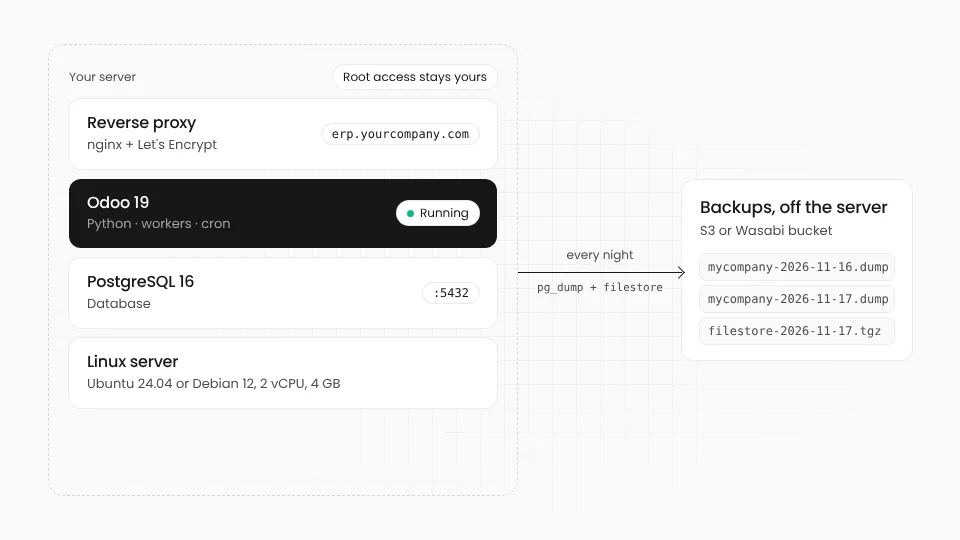
Odoo is a Python application on top of PostgreSQL. It runs on any modern Linux server, in your office or at any cloud.
01
A Linux server
Ubuntu 24.04 or Debian 13 is the easy path (Odoo 20 needs PostgreSQL 16, which Debian 12 does not ship). 2 vCPU and 4 GB of memory comfortably serve a small team; add CPU and memory as users grow.
02
PostgreSQL
On the same server for most companies, or a managed database when you need high availability.
03
A domain and TLS
A name such as erp.yourcompany.com, and a reverse proxy like nginx with a Let's Encrypt certificate in front of Odoo.
04
Somewhere for backups
Off the server: object storage such as S3 or Wasabi, so a lost server is not lost data.
Three ways to self-host Odoo
All three run the same Odoo. They differ in how much of the day-to-day work stays with you.
Official packages
Install Odoo with apt from Odoo's own repository
- Closest to Odoo's documentation
- Simple for one database on one server
- You handle the proxy, backups and updates
Docker
The official odoo image next to a postgres container
- Easy to rebuild and to move between servers
- Versions pinned in one file
- You handle the proxy, backups and updates
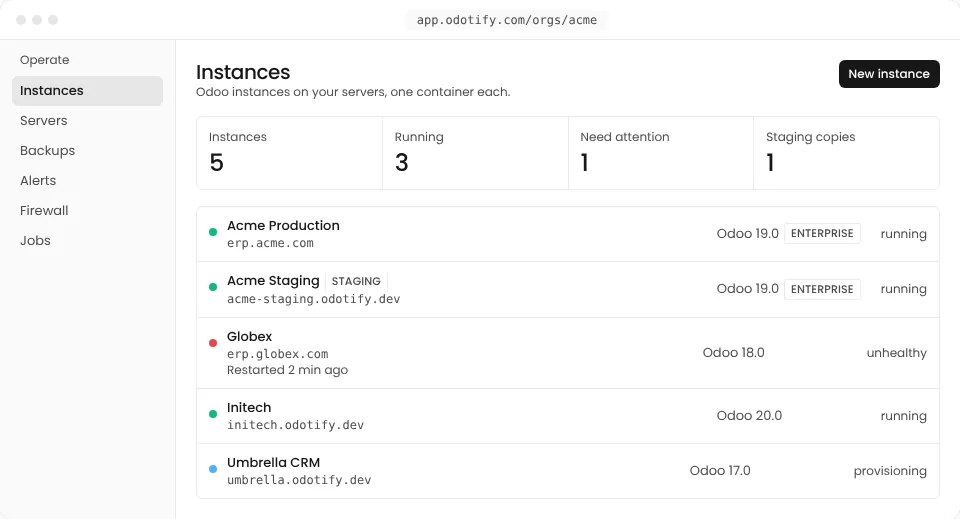
Odotify, on your server
Your server, set up and run for you
- Each instance in its own container, on any server you reach over SSH
- TLS, firewall, backups, restore drills and monitoring included
- One flat fee from $0, root access stays yours
Install
Install Odoo in a few commands
Both routes give you a working Odoo on port 8069. Pick one, then follow the production checklist below before real users log in.
With Odoo's packages
Odoo publishes a Debian package for each version. It installs Odoo as a system service that starts with the server.
# Ubuntu 24.04 or Debian 13, as a user with sudo
sudo apt-get update && sudo apt-get install -y postgresql wget gnupg
wget -qO - https://nightly.odoo.com/odoo.key \
  | sudo gpg --dearmor -o /usr/share/keyrings/odoo-archive-keyring.gpg
echo 'deb [signed-by=/usr/share/keyrings/odoo-archive-keyring.gpg] https://nightly.odoo.com/19.0/nightly/deb/ ./' \
  | sudo tee /etc/apt/sources.list.d/odoo.list
sudo apt-get update && sudo apt-get install -y odoo
# Odoo now answers on port 8069; its settings are in /etc/odoo/odoo.conf
With Docker
The official odoo image needs a PostgreSQL container beside it. Your own modules go in the addons folder.
# compose.yaml, then: docker compose up -d
services:
  db:
    image: postgres:16
    environment:
      POSTGRES_DB: postgres
      POSTGRES_USER: odoo
      POSTGRES_PASSWORD: change-me
    volumes: [db-data:/var/lib/postgresql/data]
  odoo:
    image: odoo:19.0
    depends_on: [db]
    ports: ["127.0.0.1:8069:8069"]
    environment:
      HOST: db
      USER: odoo
      PASSWORD: change-me
    volumes: [odoo-data:/var/lib/odoo, ./addons:/mnt/extra-addons]
volumes:
  db-data:
odoo-data:Commands for Odoo 19 Community. For Enterprise, install the code that comes with your subscription instead. Replace change-me with a strong password, and keep port 8069 closed to the internet: only the proxy should reach it.
Production checklist
What a production Odoo needs
Installing takes an hour. Running Odoo safely for years is the real work, and it is where most self-hosted setups fall short.
- TLS and a reverse proxynginx in front, HTTPS only, and the websocket path sent to Odoo's gevent port (8072) when workers are on.
- Workers and limitsSet workers from your CPU count, with memory and time limits, so one heavy report cannot stop everyone else.
- Lock the database managerSet a strong admin_passwd and list_db = False, so nobody can download or drop a database from the web.
- Backups you have restoredDaily database and filestore backups off the server, and a regular test restore. An untested backup is a hope.
- UpdatesOdoo publishes fixes for each version often; the operating system needs security updates too.
- Monitoring and a firewallKnow when the disk fills or Odoo stops answering, and block repeated failed logins.
Odotify does every item on this list, on your own server.
Self-hosting questions
01Can I self-host Odoo Enterprise?
Yes. Odoo Enterprise on your own server needs Odoo's Custom plan; you install the Enterprise code that comes with the subscription. Odoo Community needs no subscription at all.
02How big a server does Odoo need?
A server with 2 vCPU and 4 GB of memory runs a small company comfortably. Plan more CPU for more simultaneous users and more memory for large databases, heavy reports or many workers, and keep disk space for the filestore and backups.
03Is self-hosting cheaper than Odoo.sh or Odoo Online?
Usually, on the hosting bill: a server costs the same whatever the number of users. The cost moves to the time spent on updates, backups and security, which is what a managed service on your server takes over. The Odoo pricing guide has a calculator.
04Docker or the official packages?
Packages are the simplest for one database on one server. Docker makes it easier to run several versions side by side, rebuild a server or move to another one. Odotify runs each instance in its own container for that reason.
05Does self-hosting help with GDPR?
It lets you choose where the data lives, for example a server in Germany or France, and who can reach it. You are still responsible for securing it, which is why the production checklist matters.
Your server. Odoo looked after.
Connect any Linux server you reach over SSH and Odotify installs, secures, backs up and updates Odoo on it. Start free on one instance.