Odoo Nginx reverse proxy: HTTPS, websocket and proxy_mode
Odotify team · Published · 9 min read
Odoo has its own web server, but it should never face the internet on its own. Odoo's deployment documentation says it plainly: Odoo sends login details in clear text, so "a secure deployment of Odoo must use HTTPS", and the usual way to get HTTPS is a reverse proxy such as Nginx. This guide gives a complete Nginx configuration for Odoo 17, 18, 19 and 20, explains each line, adds a free Let's Encrypt certificate and lists the errors people hit most. Everything below comes from Odoo's 20.0 deployment guide, the nginx.org reference and Certbot's instructions, checked on 23 November 2026.
Why put Nginx in front of Odoo?
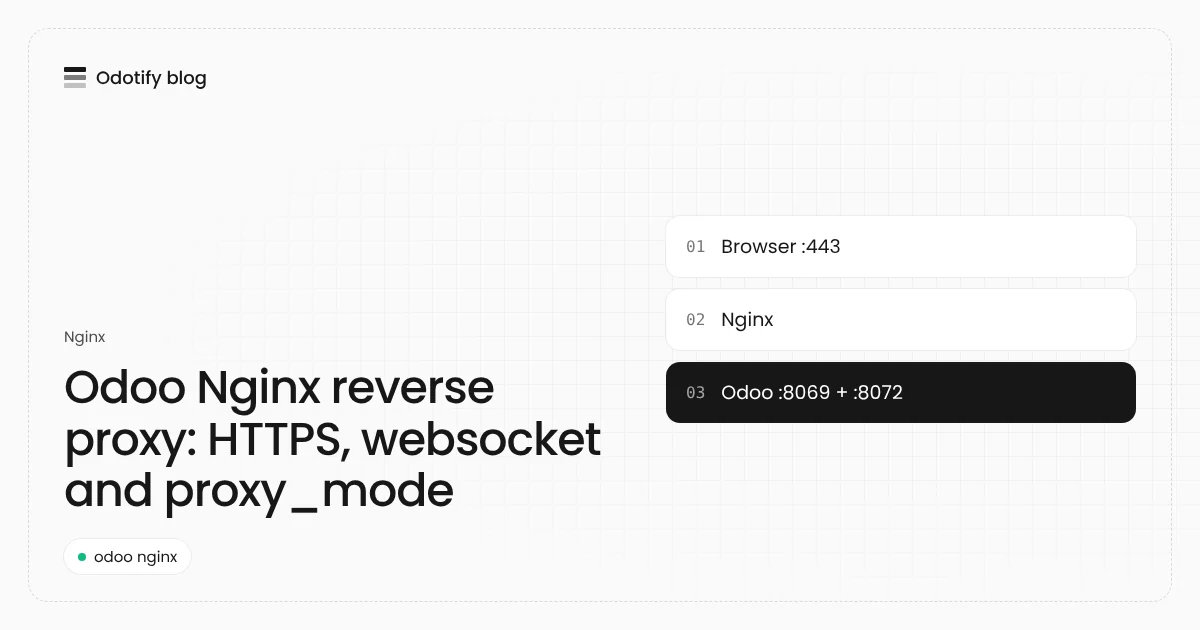
Nginx gives Odoo HTTPS, a proper domain name and a place to route websocket traffic. Odoo itself listens on plain HTTP:
| Port | What listens there | When it is used |
|---|---|---|
| 8069 | Odoo's HTTP server (web client, website, API) | Always |
| 8072 | Odoo's gevent worker for websockets (Discuss, live chat, notifications) | When workers is above 0 |
With workers = 0, the default threaded mode that Odoo calls "primarily used for development", everything goes through 8069. In production you run with workers (see Odoo workers configuration), and then Odoo starts a separate live-chat worker on the gevent port. Odoo's documentation is explicit: "You must deploy a proxy in front of Odoo and redirect incoming requests whose path starts with /websocket/ to the LiveChat worker." Without that route, chat and notifications silently stop working.
Nginx also gives you:
- TLS termination with a free certificate, and a redirect from HTTP to HTTPS;
- one public port (443) instead of two Odoo ports open to the world;
- gzip compression, long timeouts for big reports and imports, and optional static file serving;
- security headers (HSTS) and secure cookie flags.
What is proxy_mode in Odoo?
proxy_mode = True tells Odoo to read the real client details from the proxy's headers. Behind Nginx, every request reaches Odoo from 127.0.0.1 over plain HTTP. With proxy mode on, Odoo uses X-Forwarded-Host, X-Forwarded-For and X-Forwarded-Proto instead, so it builds https:// links, logs the visitor's IP and keeps the right hostname.
Odoo's guide adds a warning: proxy mode "should only be enabled when Odoo is behind a reverse proxy". If Odoo is reachable directly, anyone can send forged headers. Turn it on only together with a firewall that keeps ports 8069 and 8072 private.
Add it to /etc/odoo/odoo.conf (or your own config file):
[options]
proxy_mode = True
workers = 4
max_cron_threads = 1
gevent_port = 8072
http_interface = 127.0.0.1
http_interface = 127.0.0.1 makes Odoo listen only on the local machine, so the proxy is the only way in. Pick the worker count from your CPU and users; 4 is only an example.
The Nginx configuration for Odoo
This is Odoo's own reference configuration, with a body size limit added and paths you can copy. Save it as /etc/nginx/sites-available/odoo.conf and replace odoo.example.com with your domain.
upstream odoo {
    server 127.0.0.1:8069;
}
upstream odoochat {
    server 127.0.0.1:8072;
}
map $http_upgrade $connection_upgrade {
    default upgrade;
    ''      close;
}

# HTTP -> HTTPS
server {
    listen 80;
    server_name odoo.example.com;
    rewrite ^(.*) https://$host$1 permanent;
}

server {
    listen 443 ssl;
    server_name odoo.example.com;

    proxy_read_timeout 720s;
    proxy_connect_timeout 720s;
    proxy_send_timeout 720s;
    client_max_body_size 100m;

    ssl_certificate     /etc/letsencrypt/live/odoo.example.com/fullchain.pem;
    ssl_certificate_key /etc/letsencrypt/live/odoo.example.com/privkey.pem;
    ssl_session_timeout 30m;

    access_log /var/log/nginx/odoo.access.log;
    error_log  /var/log/nginx/odoo.error.log;

    # Websockets go to Odoo's gevent port
    location /websocket {
        proxy_pass http://odoochat;
        proxy_set_header Upgrade $http_upgrade;
        proxy_set_header Connection $connection_upgrade;
        proxy_set_header X-Forwarded-Host $http_host;
        proxy_set_header X-Forwarded-For $proxy_add_x_forwarded_for;
        proxy_set_header X-Forwarded-Proto $scheme;
        proxy_set_header X-Real-IP $remote_addr;
        add_header Strict-Transport-Security "max-age=31536000; includeSubDomains";
        proxy_cookie_flags session_id samesite=lax secure;
    }

    # Everything else goes to the HTTP workers
    location / {
        proxy_set_header X-Forwarded-Host $http_host;
        proxy_set_header X-Forwarded-For $proxy_add_x_forwarded_for;
        proxy_set_header X-Forwarded-Proto $scheme;
        proxy_set_header X-Real-IP $remote_addr;
        proxy_redirect off;
        proxy_pass http://odoo;
        add_header Strict-Transport-Security "max-age=31536000; includeSubDomains";
        proxy_cookie_flags session_id samesite=lax secure;
    }

    gzip on;
    gzip_types text/css text/scss text/plain text/xml application/xml application/json application/javascript;
}
What each part does:
- Two upstreams.
odoois the normal HTTP server on 8069;odoochatis the gevent worker on 8072. - The
mapblock turns the browser'sUpgrade: websocketheader intoConnection: upgrade. Without it the websocket handshake fails. - 720 second timeouts. Nginx's default
proxy_read_timeoutis 60s. Large exports, reports and imports in Odoo often take longer, and the user then sees a 504 even though Odoo is still working. client_max_body_size 100m. Nginx's default is 1 MB. Anything bigger, such as a PDF attachment, a product image import or a database restore through the web, gets a "413 Request Entity Too Large" error. Choose a limit that fits your largest upload.- HSTS and cookie flags. Odoo's guide recommends both: HSTS forces browsers to use HTTPS for a year, and
proxy_cookie_flagsmarks thesession_idcookieSecureandSameSite=Laxagainst cross-site request forgery.proxy_cookie_flagsneeds Nginx 1.19.3 or later; Ubuntu 24.04 ships Nginx 1.24.
Odoo's own example also pins ssl_protocols and a cipher list. Certbot writes a maintained set of TLS options for you, so you can leave those two lines out when you use it.
Steps to set up Nginx and HTTPS for Odoo
These commands are for Ubuntu 24.04 or Debian with Odoo already running on port 8069 (see Install Odoo on Ubuntu 24.04). Point your domain's DNS A record at the server first: Let's Encrypt checks the domain over port 80.
- Install Nginx:
sudo apt update && sudo apt install nginx. - Set
proxy_mode = True,gevent_port = 8072andhttp_interface = 127.0.0.1inodoo.conf, then restart Odoo:sudo systemctl restart odoo. - Install Certbot with snap, as Certbot's instructions recommend:
sudo snap install --classic certbotandsudo ln -s /snap/bin/certbot /usr/local/bin/certbot. - Save the configuration above as
/etc/nginx/sites-available/odoo.conf, but for the first run keep only the port 80 server block without the redirect, so Certbot can answer the challenge. - Enable the site and remove the default one:
sudo ln -s /etc/nginx/sites-available/odoo.conf /etc/nginx/sites-enabled/andsudo rm /etc/nginx/sites-enabled/default. - Check and reload:
sudo nginx -t && sudo systemctl reload nginx. - Get the certificate:
sudo certbot certonly --nginx -d odoo.example.com. This only fetches the certificate and leaves your file alone;sudo certbot --nginxwould also edit the config for you. - Put the full configuration in place (the HTTPS server block with the certificate paths), then run
sudo nginx -t && sudo systemctl reload nginxagain. - Test renewal:
sudo certbot renew --dry-run. Certbot installs a timer that renews certificates before they expire. - Close Odoo's ports to the outside:
sudo ufw allow 'Nginx Full',sudo ufw allow OpenSSH, thensudo ufw enable. Do not open 8069 or 8072. - Open
https://odoo.example.com, log in, and in the browser's developer tools check that/websocketreturns status 101 (Switching Protocols).
How do I serve several Odoo databases or domains?
Add one server block per domain and set dbfilter in Odoo. Odoo's documentation says that for servers with several databases, "especially if website is used, dbfilter must be set". dbfilter = ^%d$ picks the database whose name equals the first part of the domain (database acme for acme.example.com). Once each hostname matches exactly one database, set list_db = False to hide the database manager, as Odoo's security section recommends.
If each company is a separate legal entity in one database instead, you do not need extra databases at all: see Odoo multi-company.
Can Nginx serve Odoo's static files?
Yes, and it lightens the load on Odoo's workers. Odoo's guide shows a location ~ ^/[^/]+/static/.+$ block that serves files from each module's static/ folder with expires 24h, falling back to Odoo when a file is not found. The root and try_files lines depend on your addons_path. For a Debian package install the guide uses:
location ~ ^/[^/]+/static/.+$ {
    root /usr/lib/python3/dist-packages/odoo/addons;
    try_files $uri @odoo;
    expires 24h;
}
with location @odoo { ... } holding a copy of your location / block. Attachments from the filestore can also be handed to Nginx with Odoo's --x-sendfile option plus an internal location /web/filestore; Odoo still checks access rights first. Both are optional. Start without them and add them when you measure a need, for example with the steps in why Odoo is slow.
Common Odoo Nginx errors and fixes
| Symptom | Likely cause | Fix |
|---|---|---|
| "Connection lost" banner, chat and notifications never arrive | /websocket not routed to 8072, or Upgrade/Connection headers missing | Add the location /websocket block and the map above; check gevent_port |
Links and redirects use http:// or 127.0.0.1 | proxy_mode off, or X-Forwarded-* headers missing | Set proxy_mode = True and keep all four proxy_set_header lines |
| 413 Request Entity Too Large on upload | Nginx default body limit of 1 MB | Raise client_max_body_size |
| 504 Gateway Time-out on big reports or imports | Nginx default 60s proxy timeout | Set the three proxy timeouts to 720s |
| Endless redirect loop | Redirect from HTTP to HTTPS done twice, or a CDN connecting to the server over HTTP | Redirect once in Nginx; set the CDN to connect over HTTPS |
| Certbot challenge fails | DNS not pointing to the server, or port 80 closed | Fix the A record and allow port 80 |
nginx -t complains about http2 | http2 on; needs Nginx 1.25.1 or later | Use listen 443 ssl http2; on older Nginx, or leave HTTP/2 off |
Nginx, Caddy or Traefik?
Any TLS-terminating proxy works, as long as it routes /websocket to the gevent port and passes the forwarded headers. Nginx has the advantage that Odoo documents it, so its examples match yours. Caddy fetches certificates on its own and is shorter to configure; our Odoo Docker guide uses it with Docker Compose. Traefik suits setups that already run many containers.
Skip the manual setup with Odotify
Odotify is our product. When you attach a server or create one at a provider, Odotify's agent writes an Nginx site for each Odoo instance with the websocket route and forwarded headers, gets a Let's Encrypt certificate (HTTP-01 through Nginx, or DNS-01 for instances on our domain), renews it, and redirects HTTP to HTTPS. Custom domains get their own certificate when the DNS points at the server. Odoo 17 to 20, Community or Enterprise, run on your own server, at a flat fee from $0 a month: see pricing or the self-hosted Odoo guide if you want to run it all yourself.
FAQ
Does Odoo need Nginx?
Odoo runs without it, but Odoo's documentation says a secure deployment must use HTTPS, and Odoo does not terminate TLS itself. Some reverse proxy is needed in production; Nginx is the one Odoo documents.
What port does Odoo use for websockets?
Port 8072, the default gevent_port. It is used when workers is above 0. Route every request whose path starts with /websocket to it; everything else goes to port 8069.
Why does Odoo show "Connection lost" behind Nginx?
The websocket cannot connect. Usually /websocket is sent to port 8069 instead of 8072, or the Upgrade and Connection headers are not forwarded. Add the map block and the websocket location from this guide.
What does proxy_mode = True do?
It makes Odoo trust the X-Forwarded-Host, X-Forwarded-For and X-Forwarded-Proto headers from the proxy, so it builds HTTPS links and sees real client IPs. Enable it only when Odoo is reachable through the proxy alone.
How do I get a free SSL certificate for Odoo?
Use Let's Encrypt through Certbot: install it with sudo snap install --classic certbot, then run sudo certbot certonly --nginx -d your.domain (or sudo certbot --nginx to let it edit the config). Certbot renews the certificate automatically.
How do I fix 413 Request Entity Too Large in Odoo?
Raise client_max_body_size in the Nginx server block, for example to 100m, then reload Nginx. The default is 1 MB.
Sources
- Odoo 20.0 documentation, System configuration (dbfilter, workers, LiveChat, HTTPS, static files, security): https://raw.githubusercontent.com/odoo/documentation/20.0/content/administration/on_premise/deploy.rst
- nginx.org, core module (
client_max_body_sizedefault 1m): https://nginx.org/en/docs/http/ngx_http_core_module.html - nginx.org, proxy module (
proxy_read_timeoutdefault 60s,proxy_cookie_flagssince 1.19.3): https://nginx.org/en/docs/http/ngx_http_proxy_module.html - nginx.org, HTTP/2 module (
http2directive since 1.25.1): https://nginx.org/en/docs/http/ngx_http_v2_module.html - Certbot instructions for Nginx with snap: https://certbot.eff.org/instructions?ws=nginx&os=snap
- Ubuntu packages, nginx in noble (24.04): https://packages.ubuntu.com/noble/nginx

Odotify team
Odotify hosts Odoo on servers its customers own. This article was researched against live search results and the Odotify codebase.